
TLDR: Raw speech-to-text output lacks all punctuation marks and capitalization. Automatic punctuation and truecasing address this issue and enable readable sentences, restoring natural formatting by creating production-ready transcripts that don't require manual cleanup. Learn how to enable automatic punctuation and truecasing in Python for batch transcription and real-time speech-to-text.
What Are Automatic Punctuation and Truecasing in Speech-to-Text?
Raw speech-to-text output lacks the formatting needed for readability. Automatic punctuation and truecasing solve this by transforming unformatted transcripts into professional, readable text without manual editing. This formatting enables transcripts to be used directly in documentation, captions, meeting notes, and reports without time-consuming post-processing.
For example:
Without automatic formatting:
With automatic formatting:
The difference is immediate: properly formatted transcripts are ready for professional use, while raw output requires manual editing to add periods, commas, question marks, and capitalization.
What's the Difference Between Punctuation and Casing?
Punctuation adds grammatical marks like periods, commas, and question marks based on speech patterns and natural pauses. For example, converting "hello how are you" to "hello, how are you?" adds the comma and question mark.
Casing (truecasing) handles capitalization for proper nouns and sentence beginnings. For example, converting "hello, how are you" to "Hello, how are you" capitalizes the sentence start, while "john lives in london" becomes "John lives in London" with proper noun capitalization.
Most modern speech-to-text engines like Leopard Speech-to-Text and Cheetah Streaming Speech-to-Text provide both automatically. Without casing, even punctuated text looks unprofessional: "hello, john works at nasa." vs "Hello, John works at NASA."
How Do I Make the Speech-to-Text Model Output Punctuation?
Some Python speech recognition libraries, such as SpeechRecognition, Google Web Speech API, and Whisper, omit or provide minimal punctuation by default. Two solutions enable punctuation in transcripts:
Step 1: Use a speech-to-text engine with built-in punctuation, such as Leopard Speech-to-Text, Cheetah Streaming Speech-to-Text, Google Cloud Speech-to-Text, or AWS Transcribe.
Step 2: Enable punctuation features in your API configuration by setting the appropriate parameter (such as
enable_automatic_punctuation=Truefor Picovoice Speech-to-Text models).
How to Add Punctuation and Capitalization for Batch & Streaming STT
This tutorial covers automatic punctuation and truecasing for both batch and real-time speech-to-text in Python:
- Batch Audio File Transcription with Leopard Speech-to-Text - For pre-recorded audio files (meeting recordings, documentation, interviews, podcasts)
- Real-Time Transcription with Cheetah Streaming Speech-to-Text - For live transcription (dictation software, live captions, real-time meeting transcription)
Both speech-to-text models enable automatic formatting with a single parameter: enable_automatic_punctuation=True and process audio on-device for low-latency transcription.
Prerequisites
- Python 3.9+
- Audio file (WAV, MP3, FLAC, or other common formats) for batch transcription or microphone access for real-time transcription
- Picovoice
AccessKeyfrom Picovoice Console
Batch Transcription with Punctuation and Capitalization In Python
Leopard Speech-to-Text transcribes pre-recorded audio files with automatic punctuation and truecasing.
Install the Speech-to-Text SDK
Install Leopard Speech-to-Text SDK using pip:
Full Code: Audio File Transcription with Automatic Punctuation and Truecasing
Here's the complete working code that transcribes an audio file with automatic formatting:
Setting enable_automatic_punctuation=True enables automatic punctuation insertion and truecasing.
Run the Batch Transcription Script
Replace ${ACCESS_KEY} with your AccessKey from Picovoice Console and path/to/your/audio.wav with your audio file path to run the script:
Leopard Speech-to-Text offers additional production-ready features like speaker diarization, word-level confidence scores, and timestamps. Explore all speech-to-text features to get reliable and high quality transcriptions.
Real-Time Streaming Transcription with Punctuation and Capitalization
Cheetah Streaming Speech-to-Text transcribes audio streams in real-time with automatic punctuation and truecasing.
Install the required Python Libraries
Install Cheetah Streaming STT Python SDK pvcheetah and Python Audio Recorder pvrecorder, using pip:
Full Code: Real-Time Transcription with Automatic Punctuation and Truecasing
Here's the complete code for real-time streaming transcription with automatic formatting:
Setting enable_automatic_punctuation=True enables automatic punctuation insertion and truecasing while the is_endpoint flag detects natural pauses in speech to structure output into readable segments.
Run the Real-Time Transcription Script
Replace ${ACCESS_KEY} with your AccessKey from Picovoice Console and run the script:
How Accurate is Automatic Punctuation?
Leading AI models achieve punctuation accuracy that can rival human editors for general-purpose audio. Punctuation accuracy is measured using Punctuation Error Rate (PER), which shows how closely predicted punctuation aligns with reference transcripts. Lower PER reflects more reliable sentence boundaries and capitalization.
In batch transcription, speech-to-text models can use the full audio context to generate transcripts, which often leads to higher overall accuracy for word recognition, truecasing and punctuation. In contrast, real-time transcription models must emit text as audio arrives, making accurate punctuation and capitalization decisions more challenging without seeing future speech.
Despite this challenge, modern streaming speech-to-text engines achieve production-ready punctuation accuracy. In practice, even small improvements in PER can significantly reduce manual cleanup and improve readability in live transcription workflows.
How Do I Compare Punctuation Accuracy Across Different STT APIs?
To evaluate and compare punctuation accuracy across speech-to-text engines, use Punctuation Error Rate (PER) as your metric. The open-source real-time transcription benchmark provides standardized test datasets showing:
- Cheetah Streaming Speech-to-Text: 85% punctuation accuracy (15% PER)
- Google Streaming Speech-to-Text: 64% punctuation accuracy (36% PER)
Cheetah Streaming Speech-to-Text delivers lower Punctuation Error Rate than major cloud-based streaming STT services, with less than half the PER of Google Streaming Speech-to-Text.
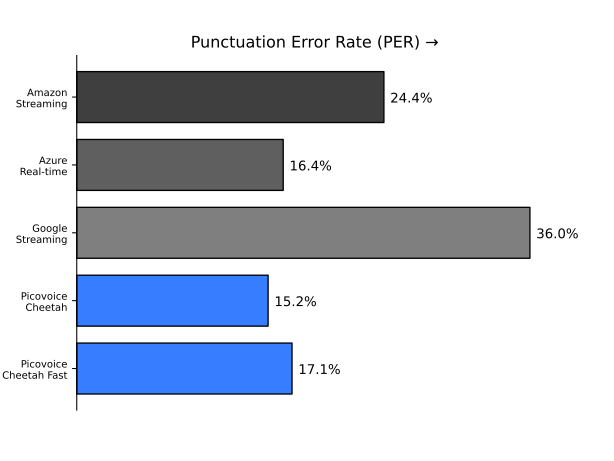
To test yourself:
- Create a test dataset with known correct punctuation
- Run audio through different STT engines
- Calculate PER by comparing predicted vs. actual punctuation
For production applications, we suggest engines with PER<20% for professional results.
Start building speech recognition applications with automatic punctuation and truecasing for professional-quality transcripts today!
Start Free


