
Speech-to-text, also known as automatic speech recognition (ASR), voice-to-text or audio transcription, converts spoken audio into written text. Organizations record thousands of hours of speech every day across customer calls, clinical consultations, podcast episodes, meetings, and more. Speech-to-text turns the recordings into transcripts that software can search, analyze, and build on.
In this guide, you'll learn how speech-to-text works, how it is different from streaming speech-to-text, how to evaluate accuracy, how on-device and cloud deployment compare, and how to integrate speech recognition into an application.
Table of Contents
- What is Speech-to-Text?
- Why Convert Speech to Text?
- Streaming vs Batch: Choosing the Right Speech-to-Text Mode
- Speech-to-Text vs Related Technologies
- How Does Speech-to-Text Work?
- Types of Speech-to-Text Models
- Speech-to-Text Deployment Options
- What Do Speech-to-Text Systems Output?
- What Are Common Speech-to-Text Challenges?
- How to Customize a Speech-to-Text Model?
- How to Evaluate and Choose a Speech-to-Text Solution?
- How to Add Speech-to-Text to Your Application?
- What Are the Use Cases of Speech-to-Text?
- Speech-to-Text Best Practices
- Developer Resources
- Conclusion
What is Speech-to-Text?
Speech-to-text software transcribes spoken audio into text. Modern engines rely on neural networks trained on vast datasets of labeled audio to map sound waves to written words across different languages, accents, vocabulary, and background environments.
Why Convert Speech to Text?
The main benefit of speech-to-text is that it turns unstructured audio into searchable and machine-readable text. Once speech is transcribed, applications can search recordings, analyze conversations, generate summaries, extract information, and create structured records.
Instant searchability: A phrase, a name, or a topic surfaces in seconds across thousands of hours of recordings.
Automated voice analytics: Sentiment, compliance flags, and recurring customer topics emerge at scale from downstream text-processing tools.
Structured documentation: Spoken conversations become actionable records, clinical documentation, and searchable meeting archives.
Accessibility: Spoken content reaches individuals who rely on or prefer written text.
Streaming vs Batch: Choosing the Right Speech-to-Text Mode
Every speech-to-text integration begins with a fundamental decision: transcribing audio in real time or processing it from recorded files.
Live Streaming STT: processes audio chunks continuously as a speaker talks. It returns low-latency text fragments to power real-time voice agents, live captioning, and dictation features.
Batch STT: processes complete, pre-recorded audio files. It optimizes for throughput and accuracy across recorded phone calls, meeting archives, and podcast episodes.
When handling pre-recorded files, batch requests execute either asynchronously, with the application notified when the transcript is ready, or synchronously, with the caller waiting until the result returns.
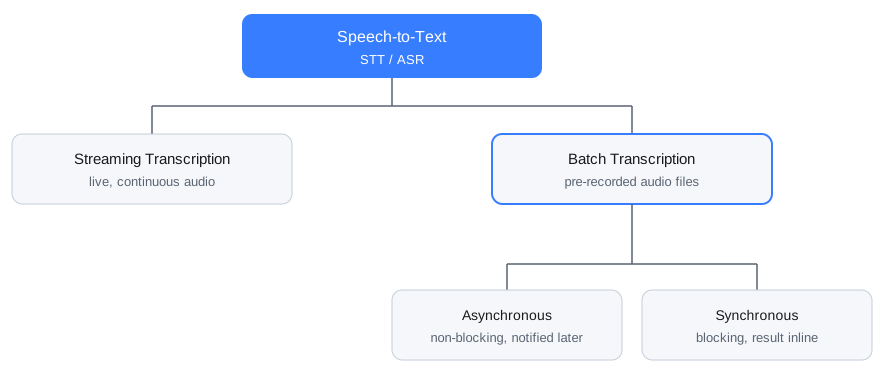
This guide focuses on batch transcription. For live transcription, see the Complete Guide to Real-Time Transcription.
What is Batch Transcription?
Batch transcription is what most people mean when they say speech-to-text: the engine processes complete, pre-recorded audio files and returns a finished transcript for each recording. Batch transcription reads the entire file before emitting text. Full-file context lets the language model weigh speech both before and after any given word, which improves accuracy on ambiguous terms, technical jargon, and homophones.
Asynchronous vs. Synchronous: Choosing the Right Batch Transcription Mode
A batch transcription job runs in one of two execution modes.
Asynchronous transcription is non-blocking. The application hands the file off to the engine and immediately regains control to handle other tasks or keep the user interface responsive. The engine processes the recording in the background, then delivers the final transcript whenever it is ready: a thread callback or promise in a local SDK, or a webhook or job queue in a cloud service.
Synchronous transcription is the blocking counterpart. The application hands audio to the engine and waits until transcription completes, receiving the finished text inline. This pattern suits short clips and simple scripts, where blocking the caller costs nothing.
Batch transcription often runs asynchronously because long recordings and large backlogs are better suited to background processing. However, batch and asynchronous transcription describe different concepts: batch refers to how audio is processed, while asynchronous refers to how the application handles the transcription job.
When Should You Use Batch Transcription?
Choose batch transcription when the audio already exists as files and results can arrive on your schedule:
Stored audio archives: media exports, recorded customer calls, meeting archives, and podcast episodes.
Accuracy-critical workflows: tasks where full-recording context must resolve complex domain vocabulary correctly.
High-volume backlogs: automated background pipelines that process thousands of recorded hours cost-effectively.
Leopard Speech-to-Text transcribes complete audio files on-device. For live audio, get started with Cheetah Streaming Speech-to-Text.
Speech-to-Text vs Related Technologies
Speech-to-text shares its input with several neighboring technologies that answer different questions about the same audio. Understanding the distinctions helps clarify product requirements.
Speech-to-Text vs Voice Recognition
Speech-to-text answers the question "What was said?" It converts the words in a recording into text and produces the same transcript regardless of who is speaking. Voice recognition answers a different question: it analyzes the voice itself to determine who is speaking. The two can be combined in production, with speech-to-text producing the transcript and voice recognition identifying the speaker.
The comparison of speech recognition and voice recognition breaks the terminology down in depth.
Speech-to-Text vs NLP and NLU
Speech-to-text is typically the intake stage of a voice pipeline: it converts spoken audio into text, while NLP and NLU systems can process that text to extract meaning and intent. Natural language processing (NLP) and natural language understanding (NLU) operate downstream on the generated transcript: they classify intent, extract entities, summarize takeaways, and route tickets based on detected topics. For example, a contact center transcribes a recorded call first, and NLP then classifies the complaint topic and flags compliance phrases.
Standard voice pipelines chain speech-to-text and NLP in sequence, while speech-to-intent engines go straight from audio to a structured intent.
NLP applications in voice recognition shows how enterprises pair the two technologies.
Speech-to-Text vs Text-to-Speech
Text-to-speech and speech-to-text run in opposite directions along the voice pipeline. Speech-to-text ingests spoken audio and outputs written text, so software can listen. Text-to-speech takes written text and synthesizes natural-sounding audio, so applications can speak. Voice assistants and conversational AI agents pair both to hold a complete two-way spoken exchange.
The Complete Guide to Text-to-Speech covers the synthesis side.
Where Speech-to-Text Fits in a Voice AI Pipeline
Speech-to-text usually sits in the middle of a longer pipeline for recorded audio. Noise suppression cleans the signal before transcription, and spoken language identification detects the language so the right model transcribes it. Speaker diarization separates who spoke when. It runs as its own stage or inside the speech-to-text engine, which then labels speakers as it transcribes. Speech-to-text then produces the transcript, and NLP tools or an LLM turn the text into answers, summaries, and decisions.

How Does Speech-to-Text Work?
At a high level, speech-to-text systems convert an audio waveform into features, use a speech recognition model to identify likely words, and decode those predictions into a text sequence. Post-processing can then add punctuation, capitalization, timestamps, and other metadata.
A speech-to-text engine converts audio into text through three conceptual stages: feature extraction, modeling, and decoding. Hybrid engines build them as separate components, and modern end-to-end engines merge modeling and decoding inside a single neural network.

Audio Input and Feature Extraction
The engine receives audio as a digital waveform. It splits the continuous audio into short frames and transforms them into spectral features, such as mel-spectrograms, which measure how sound energy distributes across frequencies over time. These features provide mathematical representations of the audio that neural networks can process to recognize speech patterns. In batch transcription, the engine receives the complete waveform before processing begins.
Acoustic and Language Models
The engine uses two modeling functions, as separate modules or integrated within a single end-to-end neural network:
Acoustic model: maps spectral features to phonetic units, the basic sounds of speech.
Language model: evaluates grammar, word order, and context to decide which candidate words belong together.
If the acoustic model hears sounds that could spell either "their" or "there", the language model uses the surrounding sentence to select the correct word. A decoder searches the candidates for the best word sequence, commonly with beam search, which keeps the strongest candidates at each step.
Model design has moved through three eras:
Early systems paired hidden Markov models with Gaussian mixture models.
Hybrid systems replaced the mixture models with neural networks and kept the separate
language model.End-to-end systems map audio to text in a single network trained with objectives such as connectionist temporal classification (CTC) and attention, and transformer and Conformer encoders now dominate the field. Foundation models extend the approach with training corpora measured in hundreds of thousands of hours.
For a deeper look, the comparison of end-to-end and hybrid speech-to-text explains the trade-offs, and the best neural network architecture for speech recognition argues that training quality decides more than architecture choice.
Decoding and Formatting
The decoder produces a sequence of recognized words, which post-processing can then format into a readable transcript with punctuation, capitalization, and normalized numbers. Post-processing works in two passes. Automatic punctuation and truecasing restore the structure that speech carries only as pauses and intonation: sentence boundaries, commas, and capital letters. Inverse text normalization then rewrites spoken forms into written ones, so "twenty five dollars" becomes $25 and "march third" becomes March 3.
Leopard Speech-to-Text runs the complete STT pipeline on-device and matches cloud accuracy at a fraction of the model size.
Types of Speech-to-Text Models
Selecting the right speech-to-text model depends on hardware constraints, accuracy requirements, and operating domain. Modern ASR models fall into three classes:
Large foundation models train on massive multilingual datasets spanning hundreds of thousands of hours and offer broad generalization across accents, domains, and noise conditions. Whisper spans 39 million to 1.6 billion parameters across its variants. However, larger variants typically require substantially more memory and compute resources, which can make them impractical for many on-device deployments.
Compact on-device models are optimized for computational efficiency, executing directly on local CPUs, mobile chips, and embedded processors and processing audio locally where it is captured.
Domain-specialized models train or tune for narrow verticals such as clinical medicine, legal proceedings, or technical engineering. Medical transcription systems recognize pharmaceutical names and clinical terms that general corpora underrepresent, and keeping the vocabulary current takes ongoing model updates.
Speech-to-Text Deployment Options
Speech-to-text deployment decides where audio data travels, and that choice shapes security, operating cost, network reliance, and more.
Cloud Speech-to-Text
Cloud services upload audio recordings across the internet to vendor-managed servers, and the vendor handles infrastructure scaling. Cloud APIs require continuous connectivity, carry unbounded costs as volume grows, and introduce data privacy compliance hurdles for sensitive audio.
On-Device Speech-to-Text
On-device engines run entirely on local host hardware: desktop workstations, smartphones, edge servers, and embedded boards. Audio files never leave the device boundary, eliminating bandwidth overhead and simplifying compliance reviews for regulated environments under HIPAA, GDPR, and CCPA.
Self-Hosted Speech-to-Text
Enterprises with large private archives deploy transcription engines on self-hosted servers or private cloud infrastructure. This approach provides centralized administrative control while allowing organizations to keep audio processing within their own networks or private infrastructure.
What Do Speech-to-Text Systems Output?
A minimal speech-to-text response contains only the recognized text. Production ASR engines return structured payloads that pair every recognized word with machine-readable metadata, giving downstream systems the timing, attribution, and reliability signals that raw text omits:
Structured output enables downstream software features:
Word-level timestamps:
start_secandend_secmarkers align the generated text with the original audio, enabling precise audio seeking and caption alignment for video subtitling and interactive media players.Confidence scores: Per-word probability scores highlight low-confidence terms, so automated systems can flag specific words for human review. This is particularly useful in high-stakes workflows, such as legal and clinical transcription, where errors carry real consequences.
Speaker labels: A
speaker_tagon each word attributes speech turns to participants in multi-speaker recordings, so meeting minutes and call transcripts read as attributed dialogue.Formatting and truecasing: Post-processing inserts missing punctuation and capitalizes proper nouns to ensure transcripts are readable and publishable without manual cleanup.
Together, these metadata fields turn a plain transcript into structured data. By capturing exact word boundaries, speaker turns, and confidence metrics directly in the initial payload, developers can build audio search, automate clip extraction, and power human-in-the-loop review workflows without requiring extra post-processing.
What Are Common Speech-to-Text Challenges?
The biggest factors affecting speech-to-text accuracy are audio quality, accents and dialects, background noise, specialized vocabulary, language coverage, and overlapping speakers.
Advanced neural networks still face acoustic and linguistic challenges in production transcription:
Accents and dialects: Regional speech variations, accents, and informal phrasing alter the acoustic signal, so accuracy varies with the voices in the speech. Evaluating models against real user samples exposes the gaps early.
Background noise and acoustic distortion: Room reverberation, far-field microphone capture, compression artifacts, and ambient noise reduce signal clarity. Noise suppression before transcription improves recognition on degraded audio, such as call center recordings captured over telephone lines.
Domain vocabulary and jargon: Proprietary product names, medical terminology, and legal terms appear infrequently in general training data, and unadapted models mistake specialized jargon for phonetically similar common words.
Homophones: Words that sound identical but differ in spelling, such as "principal" and "principle", rely entirely on surrounding sentence context for correct resolution.
Language coverage: Engines support a fixed set of languages, shipped as one multilingual model or separate models per language. Recordings in an unsupported language stay untranscribable until coverage catches up.
Multi-speaker speech: Multi-speaker crosstalk obscures phonetic boundaries. Pairing transcription with speaker diarization separates interleaved voices into readable dialogue.
How to Customize a Speech-to-Text Model?
When off-the-shelf engines encounter industry-specific terminology, customization bridges the accuracy gap. Depending on the organization's budget, technical resources, and domain requirements, there are three main paths:
Pre-packaged domain models: Off-the-shelf models pre-trained by vendors for specific verticals, e.g., Amazon Transcribe Medical has specialty models. They handle a domain's standard vocabulary out of the box, and the vendor decides which domains ship, which terms they cover, and when the vocabulary updates. Internal product names, proprietary acronyms, and custom brand terms still require separate adaptation.
Language model adaptation and word boosting: A self-service approach that injects out-of-vocabulary (OOV) terms, brand names, or text corpora, such as glossaries, product catalogs, and training manuals, directly into the engine's language layer. Because this process operates purely on text data, it refines sentence context and jargon recognition in minutes, requiring zero audio annotations or machine learning infrastructure.
Full acoustic fine-tuning: Retraining the core neural network weights using hundreds of hours of labeled audio recordings and matching transcripts. While effective for extreme acoustic environments, fine-tuning requires extensive labeled audio datasets, GPU compute clusters, and specialized ML engineering teams.
For most enterprise deployments, text-based adaptation provides the most practical path to improving speech-to-text accuracy. It delivers immediate precision for proprietary jargon without the operational burden of managing audio datasets or compute-heavy ML pipelines.
Picovoice Console enables developers to add custom vocabulary and boost words to Leopard Speech-to-Text in a self-service web interface, exporting custom .pv model files for on-device deployment.
How to Evaluate and Choose a Speech-to-Text Solution?
The most important factors when evaluating a speech-to-text solution are accuracy on representative audio, processing speed, language support, deployment requirements, customization options, platform support, and total cost at scale.
Selecting an audio transcription engine means evaluating accuracy, processing speed, and deployment architecture against product requirements. Production audio carries the accents, noise levels, and vocabulary of real users, so a test set built from real recordings predicts deployment accuracy better than any published figure.
Measuring Accuracy
Accuracy evaluation centers on Word Error Rate (WER), the standard industry metric. WER measures the percentage of errors by counting substitutions (), insertions (), and deletions () against a human-verified reference transcript of words:
A lower WER indicates higher transcription accuracy. While WER provides the primary benchmark, two companion metrics complete the evaluation:
Character Error Rate (CER): Applies the same error calculation to individual characters rather than whole words. CER is essential for logographic languages like Mandarin, where written text lacks explicit word boundaries.
Punctuation Error Rate (PER): Evaluates post-processing accuracy by measuring how reliably an engine restores missing commas, periods, and capitalization against the reference text.
Leopard Speech-to-Text records a 9.7% word error rate on the open-source English benchmark while spending 2.6 core-hours per 100 hours of audio, a fraction of the compute of large-model engines.
Throughput and Cost
While accuracy determines transcript quality, throughput dictates infrastructure efficiency and operational cost.
Processing speed is measured using Real-Time Factor (RTF), calculated as processing duration divided by total audio duration:
An engine operating at an RTF of 0.1 transcribes a 60-minute audio file in just 6 minutes. Lower RTF values require fewer compute resources to process large backlogs, reducing the total cost of ownership (TCO).
To simplify comparison, Picovoice maintains an open-source speech-to-text benchmark with fully reproducible accuracy and speed metrics across leading engines.
Speech-to-Text Selection Criteria
While technical metrics narrow the options, six practical criteria settle the decision when selecting a speech-to-text engine:
Accuracy on target audio: Request WER figures and dataset details from vendors, but always validate accuracy on an in-house test set. Published numbers reflect clean benchmark audio, and production recordings decide real accuracy.
Deployment fit: Identify data privacy and regulatory constraints. Regulated environments favor architectures where audio files stay under enterprise control, such as on-device processing.
Customization path: Match the engine's adaptation capabilities to available resources, e.g., custom vocabulary and boost words apply instantly, language model adaptation requires text corpora, and full fine-tuning demands labeled audio and heavy compute.
Language support: Verify engine coverage and accuracy across every target language present in the audio workflows.
Platform and SDK coverage: Ensure the engine provides native SDKs for the target stack, from server operating systems to mobile and web frameworks.
Total cost at scale: Compare cloud API charges that grow unbounded with volume against predictable, host-based compute costs.
Leopard Speech-to-Text offers on-device batch transcription with rich word-level metadata across Python, JavaScript, iOS, Android, and cross-platform frameworks, and ships per-language models for English, French, German, Italian, Japanese, Korean, Portuguese, and Spanish.
How to Add Speech-to-Text to Your Application?
Step 1: Pick the Engine
This walkthrough uses Leopard Speech-to-Text with its Python SDK: the engine runs on-device, returns word-level metadata, and accepts WAV, MP3, FLAC, MP4/m4a, Ogg, 3gp, and WebM files.
Sign up for Picovoice Console and copy your AccessKey from the home page. The AccessKey handles authentication and authorization.
Step 2: Install the Speech-to-Text SDK
Install the pvleopard package:
Step 3: Transcribe an Audio File
Create the engine and pass it the path to a recording:
process_file() returns the full transcript and a sequence of word objects.
Step 4: Read the Word-Level Metadata
Each word object carries its start and end time in seconds and a confidence value:
Enable automatic punctuation and speaker diarization at creation time:
With enable_diarization set, each word also carries a speaker_tag. Language-specific and custom vocabulary models load through the model_path argument. The Leopard Python quick start and the Python API reference cover the full API.
What Are the Use Cases of Speech-to-Text?
Converting recorded voice data into searchable text drives automation across industries:
Contact center analytics: Contact centers transcribe recorded calls and mine the text for speech analytics: compliance monitoring, sentiment tracking, complaint topics, and churn indicators. Findings that once required listening to sampled calls now come from queries across every call.
Media and podcast discovery: Publishers transcribe episodes and broadcasts for show notes, search, and discovery. Archives become quotable text, and search engines index content that audio alone would hide.
Meeting documentation: Teams turn recorded meetings into structured notes, action items, and searchable decision logs, and speaker identification across meetings attributes statements to people, so transcripts display names instead of generic speaker labels.
Clinical and professional dictation: Physicians, attorneys, and field inspectors dictate notes into structured reports and record systems. Medical dictation shows the pattern in a regulated domain, where the transcript becomes part of the clinical record.
Voicemail-to-text: Transcribed messages read at a glance, arrive by email or SMS, and archive as text, so a mailbox becomes a searchable inbox.
Speech-to-Text Best Practices
Record clean audio: Place microphones near speakers, keep background noise down, and keep compression light. Accuracy starts at the microphone.
Test on representative audio: Build the evaluation set from your production recordings, with their accents, noise, and vocabulary. Clean-audio results overstate what production will deliver.
Add domain vocabulary before scaling: Load custom vocabulary and boost words for the terms your domain repeats, and verify them on the test set.
Plan for volume: Measure throughput and cost per audio hour on your target hardware before committing an archive.
Keep humans in the loop where stakes are high: Legal, clinical, and financial transcripts warrant review workflows, and confidence values mark the words to check first.
Developer Resources
Platform-Specific Tutorials
Pick the target platform and start building:
- Transcribe speech to text with 3 lines of Python
- Spanish speech-to-text with Python
- Speech-to-text using JavaScript
- Speech-to-text using Node.js
- Speech-to-text with React.js
- Speech to text with Django
- React Native speech to text
- Android speech-to-text
- iOS speech to text
- Linux speech to text
- Ubuntu speech-to-text tutorial
- Speech recognition on Raspberry Pi
Additional Resources
- Open-source speech-to-text datasets
- Verbatim transcription: use cases and benefits
- Local speech-to-text with cloud-level accuracy
- Leopard Speech-to-Text documentation
- Speech-to-text benchmark
Conclusion
Choosing a speech-to-text solution comes down to three decisions:
Select the mode:
Batch transcriptionfits audio that already exists as files, andstreaming transcriptionfits text that must appear while a person speaks.Select the model class: Foundation models maximize generality, compact on-device models run where the audio lives, and domain-specialized models win inside their vertical.
Select the deployment: On-device processing keeps recordings under enterprise control, and cloud processing relies on vendor infrastructure.
Before committing, measure word error rate and throughput on your own recordings. Leopard Speech-to-Text delivers on-device batch transcription with word-level metadata and open, reproducible benchmark results. To start building, get an AccessKey from Picovoice Console and follow the Leopard quick start. For a large volume of audio, talk to enterprise sales.
Frequently Asked Questions
Accuracy depends on the audio and the domain. Engines are compared with word error rate, and results move with accents, background noise, and vocabulary. The open-source speech-to-text benchmark publishes reproducible comparisons across engines.
On-device engines process audio locally, so transcription runs without sending recordings to a server. Cloud APIs process audio on the provider's servers and require a connection for every job.
Batch transcription processes complete recorded files and returns the full transcript when processing finishes. Streaming transcription returns text incrementally while a person speaks. The real-time transcription guide covers the streaming side.
Security follows deployment. Audio processed on-device stays on the machine that recorded it. Audio sent to a cloud API travels to the provider and falls under its privacy, security, and compliance terms.


