
TLDR: Voice biometrics turns a person's voice into a verifiable identity. Also known as speaker verification or voice authentication, it confirms that a speaker is who they claim to be. Voice biometrics appears in modern contact centers, banking apps, and shared devices. Modern engines build a voiceprint from natural speech and match speakers in real time. This guide covers how voice biometrics works, how to measure its accuracy, and how to choose and implement a voice biometrics solution.
Table of Contents
- What Is Voice Biometrics?
- How Does Voice Biometrics Work?
- Active vs Passive Voice Biometrics
- Language-Independent Verification
- Voice Biometrics vs Other Technologies
- How Is Voice Biometrics Accuracy Measured?
- Should Voice Biometrics Run On-Device or in the Cloud?
- How to Choose a Voice Biometrics Solution?
- How to Add Voice Biometrics to Your Application?
- Developer Resources
- What Are the Use Cases of Voice Biometrics?
- Voice Biometrics Best Practices
- Conclusion
What Is Voice Biometrics?
Voice biometrics is the technology that verifies a person's identity from the unique characteristics of their voice. Every voice carries measurable traits, such as pitch, tone, rhythm, and pronunciation patterns, that are shaped by the physical structure of a speaker's vocal tract. A voice biometrics engine measures these traits to decide whether a speaker is who they claim to be.
To perform this check, the engine creates a voiceprint: a compact mathematical representation of a speaker's voice characteristics. Because a voiceprint isolates stable vocal traits rather than specific words, matching remains reliable across different conversations and often even across languages. The engine compares new audio against this saved reference to answer a simple question: "Is this the claimed person?"
While voice biometrics focuses on this one-to-one verification, much like an account confirming its owner, the same underlying voiceprints can also power speaker identification, a sibling capability that answers "Who is this?" by searching across an entire database of enrolled users.
Industry literature often uses terms like speaker verification, voice authentication, and voiceprinting interchangeably. Each term simply highlights a different facet of the technology: verification names the process, authentication names the security goal, and voiceprinting names the reference data. Together, these techniques form a subset of speaker recognition, the broader field dedicated to identifying people through speech.
How Does Voice Biometrics Work?
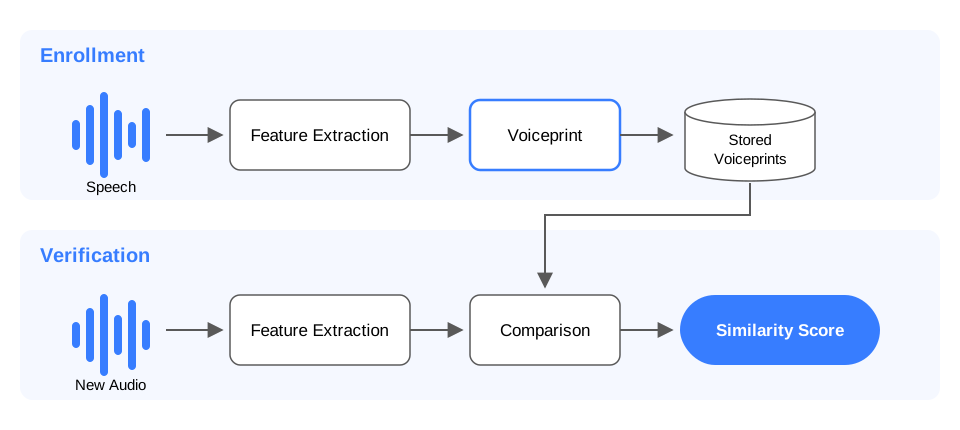
Voice biometrics engines operate through a two-phase pipeline: enrollment and matching. The enrollment phase captures speech to establish the reference profile, while the matching phase compares incoming audio against that profile in real time.
Phase 1: Enrollment
Enrollment is the initial setup process that captures a speaker's audio and condenses their vocal traits into a stored voiceprint.
Audio Capture: The engine records speech from the user.
Feature Extraction: It measures distinctive qualities, including pitch range, speaking cadence, and vocal tract resonances.
Voiceprint Generation: It condenses these stable traits into a compact reference template.
Text-independent engines enroll users from natural conversation. For instance, a customer explaining an issue to a support agent provides sufficient audio for the engine to build a voiceprint before the call ends. Supplying additional enrollment audio over time refines this voiceprint and increases future matching accuracy.
Phase 2: Verification and Scoring
Verification is the operational phase that checks new audio against an established voiceprint to confirm identity.
Sample Processing: The engine captures a new audio sample and extracts its vocal traits using the same process.
Comparison: It evaluates the sample against the stored
voiceprintof the claimed identity.Score Generation: It outputs a
similarity score, a numerical value reflecting how closely the sample matches the stored profile.Decisioning: The host application evaluates this score against a pre-configured
thresholdto return an accept or reject decision.
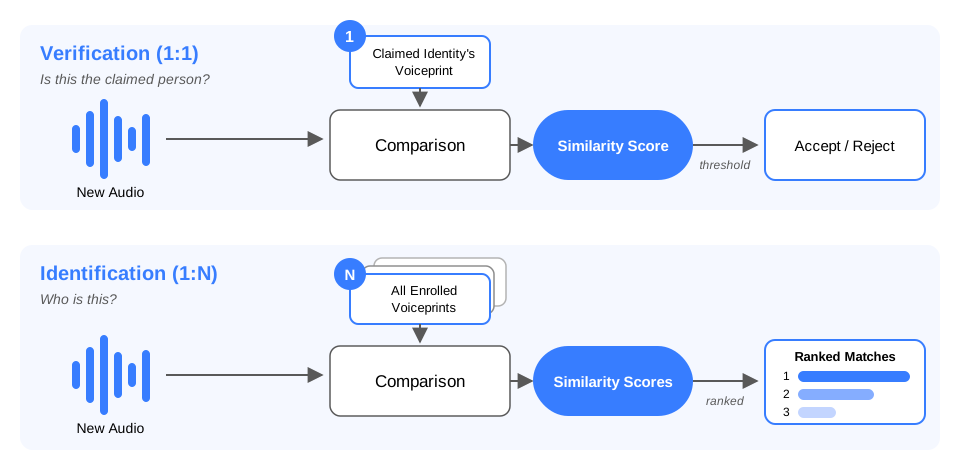
Speaker identification extends the same pipeline: the engine compares the new audio against every enrolled voiceprint instead of a single one.
Active vs Passive Voice Biometrics
Voice biometrics systems split into active (text-dependent) and passive (text-independent) deployments based on how audio is captured during verification.
Active voice biometrics requires the user to speak a fixed passphrase, serving as a spoken PIN. Because the engine knows the expected words, verification requires only a brief audio snippet. However, both enrollment and every subsequent check must use that exact phrase. Changing the phrase requires re-enrolling the user. Active systems fit deliberate security checkpoints, such as unlocking an account before initiating a bank transfer.
Passive voice biometrics operates continuously on natural speech without requiring specific words or scripts. The engine authenticates the speaker in the background during a standard conversation, such as a call with a customer service agent. While passive checks require slightly more initial audio than a passphrase, they allow continuous verification throughout an interaction without interrupting the user.
Choose active voice biometrics for explicit login moments, short interactions, and workflows where a visible security step builds user confidence.
Choose passive voice biometrics for conversational flows, hands-busy environments, and seamless checks that should run without interrupting the user experience.
Language-Independent Verification
Voice biometrics engines also differ in how they handle the language a speaker uses. Researchers build language-dependent engines around particular languages, so accuracy degrades when the enrollment and verification languages differ. Language-independent engines learn from speech spanning many languages and dialects, so a voiceprint built from English speech still matches the same speaker talking in Spanish or Mandarin. Since more than half of the world's population speaks at least two languages, language independence decides whether a single enrollment serves a multilingual user base.
Voice Biometrics vs Other Technologies
Several neighboring technologies process audio while answering completely different questions. Buyers regularly confuse these systems with voice biometrics, so understanding their distinctions helps clarify product requirements.
Voice Biometrics vs Speech Recognition
Speech recognition (often called speech-to-text or ASR) converts spoken words into text transcripts. It answers the question "What was said?" and produces the same text output regardless of who is speaking. In contrast, voice biometrics establishes the identity of the speaker and answers "Who said it?" regardless of the specific words spoken.
The two technologies complement each other effectively in modern systems. For example, a voice assistant with speaker recognition uses speech recognition to transcribe a user's command while voice biometrics verifies that the user has authorization to execute it.
Learn more about the terminology in the speech recognition vs voice recognition breakdown.
Voice Biometrics vs Speaker Identification
Speaker identification is the sibling capability to voice biometrics within the broader field of speaker recognition. Both rely on the same underlying voiceprints, but they perform different search operations:
Voice Biometrics (Verification): Performs a 1-to-1 comparison. It checks incoming audio against a single claimed
voiceprintto answer "Is this the claimed person?" The engine returns asimilarity scorefor that one comparison, and the application'sthresholdturns it into an accept or reject decision.Speaker Identification: Performs a 1-to-many search. It compares incoming audio against an entire database of enrolled
voiceprintsto answer "Who is this?" The output is typically a ranked list of potential matches with associated probabilities.
Speaker Search and Speaker Spotting are other names for speaker identification.
Voice Biometrics vs Speaker Diarization
Speaker diarization answers the question "Who spoke when?" It partitions an audio recording into distinct temporal segments based on speaker turns, labeling them with anonymous identifiers such as Speaker 1 or Speaker 2. Unlike voice biometrics, which requires enrollment to verify a known identity, diarization requires no prior voiceprints, does not know who is speaking, and resets its anonymous labels with every new audio file.
While diarization labels "when" an unknown person speaks, voice biometrics establishes "who" that person actually is. The two technologies are frequently paired in meeting processing and media transcription: diarization first splits a multi-speaker recording into individual turns, and voice biometrics then matches each turn against enrolled voiceprints to attach real names to the transcript. The cookbook walkthrough demonstrates how to identify speakers across meetings.
For a deeper technical comparison, review speaker diarization vs speaker recognition and identification.
How Is Voice Biometrics Accuracy Measured?
A voice biometrics engine returns a similarity score for every comparison, and the application converts that score into an accept or reject decision using a threshold. Accuracy measurement evaluates how often that threshold-based decision goes wrong.
Two core error metrics define voice biometrics accuracy:
False Acceptance Rate (FAR): The percentage of verification attempts where an impostor is incorrectly accepted because their audio scores above the
threshold.False Rejection Rate (FRR): The percentage of verification attempts where a legitimate enrolled user is incorrectly rejected because their audio scores below the
threshold.
Setting a threshold involves trading one error rate against the other. Raising the threshold blocks more impostors (lowering FAR) but rejects more legitimate users (raising FRR). Conversely, lowering the threshold admits more legitimate users but increases the risk of accepting impostors. High-security applications, such as banking flows, set a high threshold where false accepts are rare. Personalization features, such as tailored media playlists, set a lower threshold to prioritize user convenience.
Because changing the threshold shifts both error rates, evaluating engines requires a single baseline metric. The Equal Error Rate (EER) represents the operating point where FAR and FRR are exactly equal. A lower EER indicates a more accurate engine, making it the standard benchmark figure when evaluating speaker recognition performance.
Eagle Speaker Recognition achieves a 0.18% Equal Error Rate on the VoxConverse dataset, outperforming SpeechBrain at 0.49% and pyannote at 0.70%. The benchmark is open-source, allowing development teams to reproduce the numbers on their own audio.
Open-source Speaker Recognition Benchmark Equal Error Rate Comparison
Should Voice Biometrics Run On-Device or in the Cloud?
Where a voice biometrics engine runs determines where voiceprints are generated and stored.
The fundamental architectural difference comes down to data flow:
Cloud voice biometrics streams captured audio over the internet to remote servers, where models process the data, generate
voiceprints, and match new audio against them.On-device voice biometrics executes the entire pipeline locally on host hardware (such as a phone, vehicle, or local server), processing audio and storing
voiceprintswithout sending data over a network.
Compliance and Data Privacy
Because voiceprints are derived from human physical traits, they are classified as biometric data. Privacy frameworks like GDPR treat biometric data used for identification as a special category of personal data, while legislation like the Biometric Information Privacy Act (BIPA) in Illinois imposes strict rules and statutory penalties regarding collection, storage, and explicit consent.
Where an application creates and stores voiceprints directly impacts its compliance burden. On-device processing addresses this by architecture: audio and voiceprints never leave local hardware, simplifying compliance with GDPR, CCPA, and BIPA. On-device engines also verify speakers consistently regardless of network conditions.
When to Use Cloud vs On-Device Voice Biometrics
Choose on-device voice biometrics for:
- Regulated environments where
voiceprintsmust remain strictly within enterprise control - Products operating with intermittent connectivity, such as automotive systems, remote industrial equipment, and mobile devices
- High-volume applications where on-device processing is more cost-effective at scale
- Regulated environments where
Choose cloud voice biometrics for:
- Large-scale contact center platforms deeply integrated into existing cloud infrastructure
- Organizations that prefer vendor-hosted infrastructure
Vendor Lifecycle and Ecosystem Considerations
Regardless of deployment model, evaluating voice biometrics options requires assessing long-term product lifecycle support and migration capabilities. The voice biometrics market continues to evolve as cloud architectures shift. Specialized enterprise platforms like Pindrop provide cloud-based authentication, while major cloud providers have adjusted their portfolios, such as Microsoft retiring Azure AI Speaker Recognition effective September 30, 2025 and AWS ending support for Amazon Connect Voice ID on May 20, 2026.
Because a voiceprint dataset is generated using a specific engine's model, migrating to a new engine can require re-enrolling users. Evaluating solution continuity and export capabilities is therefore a key step in vendor selection. Eagle Speaker Recognition focuses on the on-device model, delivering text-independent speaker verification across embedded, mobile, web, and desktop environments.
How to Choose a Voice Biometrics Solution?
Evaluating a voice biometrics engine for production requires balancing accuracy, operational requirements, and long-term maintainability. Nine criteria separate the available engines when choosing a speaker recognition engine:
Verifiable accuracy: Ask vendors for their
Equal Error Rate (EER)and the specific evaluation datasets behind those numbers. Ensure claims are testable by reproducing accuracy measurements on your own target audio data.Text-dependence fit: Determine whether your application performs identity checks at explicit login moments or silently during ongoing interactions. Passphrase engines suit active authentication, while passive verification requires a
text-independentengine.Deployment model: On-device and cloud architectures split on where audio data and
voiceprintsreside. Compliance requirements under laws like GDPR and BIPA make deployment architecture the primary filter for enterprise projects.Enrollment experience: Engines vary significantly in required audio duration and scripting requirements. Enrollment friction directly impacts user onboarding and completion rates.
Streaming support: Interactive workflows require streaming capabilities that evaluate audio frame by frame in real time. Batch processing engines only fit asynchronous workflows operating on pre-recorded audio files.
Platform coverage: The engine must provide SDKs native to your target operating environments, extending across embedded hardware, mobile operating systems, web browsers, and desktop platforms.
Language coverage: Products serving multilingual users need a language-independent engine, or separate models per language.
Hardware resource constraints: Match the engine's memory footprint and compute requirements to the target hardware. A server deployment can supply GPUs, while edge targets like Raspberry Pi and mobile devices leave little headroom and favor engines that run on a standard CPU.
Vendor stability and migration: Cloud provider service updates and retirements highlight the importance of vendor roadmap continuity. Because a
voiceprintis tied to the specific engine model that generated it, changing solutions requires re-enrolling users, making long-term stability a critical factor.
Eagle Speaker Recognition satisfies these requirements for on-device deployments by providing language-agnostic, text-independent speaker verification, real-time streaming scores, and SDK support across Python, C, Node.js, iOS, Android, and Web platforms.
How to Add Voice Biometrics to Your Application?
Step 1: Pick the Engine
This walkthrough uses Eagle Speaker Recognition with its Python SDK: the engine is text-independent and language-agnostic, runs on-device, and returns similarity scores in real time. Sign up for a Picovoice Console account. Once your account is ready, copy your AccessKey from the Console home page. The AccessKey handles authentication and checks usage against account limits.
Step 2: Install Dependencies for Voice Biometrics
Install the pveagle package and PvRecorder for microphone capture:
Step 3: Enroll a Speaker Voiceprint
Create an EagleProfiler and feed it audio until enrollment reaches 100%, then export the speaker profile:
Enrollment audio should contain a single speaker in a quiet environment, and the speaker should talk in a normal voice. The exported profile is the voiceprint: the application can store it and reuse it across sessions.
Step 4: Verify or Identify Speaker at Runtime
Create the recognizer and pass it live audio along with the stored profiles:
Each call returns a similarity score within [0, 1] for every enrolled profile, and the application compares the score against its threshold. When the audio contains too little voice, process returns None. The Eagle Python quick start covers the same flow end to end, and the SDKs for C, Node.js, iOS, Android, and Web follow the same two-object structure.
Developer Resources
Platform-Specific Tutorials
Pick the target platform and start building:
- Speaker Recognition in Python
- Speaker Recognition in C
- Speaker Recognition with JavaScript
- Speaker Recognition with Node.js
- Eagle Android Quick Start
- Eagle iOS Quick Start
Cookbook Recipes
- AI Voice Assistant with Speaker Recognition
- Personalized Wake Word
- Speaker Identification Across Meetings
Additional Resources
- Choosing the Best Speaker Recognition Software
- Evaluating Speaker Recognition Performance
- The State of Speaker Recognition
- Speaker Recognition for Developers
- Language-Independent Speaker Recognition
- Open-Source Speaker Recognition Benchmark
What Are the Use Cases of Voice Biometrics?
Voice biometrics shows up wherever establishing or verifying speaker identity changes how an application responds.
Contact centers: Passive verification confirms a caller's identity in the background while they describe their issue to an agent. This replaces traditional security questions and shortens average handle time without interrupting the conversation.
Meeting and media transcription: When paired with
speaker diarization,voice biometricsmatches individual speech turns against enrolledvoiceprintsto attribute statements to specific participants. Transcripts display actual names rather than generic speaker labels.Shared and smart devices:
Voice biometricsidentifies which enrolled user is speaking to personalize responses, settings, and access control. A smart home system can adjust playlists, restrict smart lock access, or pair with a personalized wake word so a device responds exclusively to its owner.Healthcare and telehealth: Telehealth platforms verify patient identities by voice as they report symptoms or check in for appointments, ensuring medical records remain accurately tied to the right individual.
Step-up authentication: Voice serves as a secondary authentication factor alongside passwords or PINs. Active passphrases provide an intentional security checkpoint for sensitive actions like wire transfers, while passive
text-independentverification integrates smoothly into continuous conversations.
The broader applications of speaker recognition extend across additional sectors, including automotive controls, financial services, and forensics.
Voice Biometrics Best Practices
Enroll in realistic conditions: Enrollment audio should match the environment and audio hardware expected at runtime, including microphone quality and ambient noise levels. High-quality enrollment audio sets the baseline for matching accuracy.
Tune the
thresholdon representative data: The optimal scorethresholddepends on the cost of error in your specific application. Test with real target user audio to establish athresholdthat balances security and convenience.Refresh
voiceprintsperiodically: Human voices change naturally over time due to aging or health factors. Periodic re-enrollment keepssimilarity scoresreliable for long-term user accounts.Maintain explicit biometric consent: Because
voiceprintsare biometric data under GDPR, CCPA, and BIPA, always obtain explicit consent, disclose data retention policies, and provide clear privacy documentation.Design a fallback path: When a score lands close to the decision
threshold, route the user to an alternative authentication factor to preserve a smooth user experience.Test across real-world audio channels: Benchmark performance across diverse microphones, noise environments, and speaker demographics before deploying to production.
Conclusion
Implementing voice biometrics effectively comes down to three key architectural decisions:
Select the core task: Use
voice biometrics(verification) to confirm a claimed 1-to-1 identity, orspeaker identificationto find a speaker within a 1-to-many database.Choose the interaction model: Active passphrases suit explicit login moments, while passive natural speech enables continuous background verification.
Determine the deployment architecture: On-device processing keeps
voiceprintsstrictly under enterprise control and simplifies regulatory compliance, while cloud processing relies on vendor infrastructure.
Before deploying any solution, evaluate performance by measuring the Equal Error Rate on your own audio datasets. Eagle Speaker Recognition delivers text-independent, on-device voice biometrics with open, reproducible benchmark results. To start building, get an AccessKey from Picovoice Console and follow the quick start guide for your platform. Teams with additional platform or deployment requirements can contact Picovoice.
Frequently Asked Questions
Accuracy varies by engine and dataset, and the Equal Error Rate is the standard measure. Eagle Speaker Recognition achieves a 0.18% Equal Error Rate on the VoxConverse dataset, compared with 0.49% for SpeechBrain and 0.70% for pyannote, and the open-source benchmark lets teams reproduce the results on their own audio.
A voice biometrics system stores a voiceprint, a compact mathematical representation of the speaker's voice characteristics. The engine derives it during enrollment and uses it for every later comparison. It is not a recording, and the application can discard the enrollment audio once the voiceprint exists.
Yes. On-device engines process audio and store voiceprints on the hardware that records them. Eagle Speaker Recognition initializes in 4.48 MB of memory, so it runs on embedded platforms, mobile devices, web browsers, and desktops.
Each engine sets its own requirement, and text-dependent engines need less audio because the passphrase is fixed. With Eagle Speaker Recognition, enrollment completes in seconds from any natural speech, and the profiler reports enrollment progress in real time so the application can guide the user.
A voiceprint captures characteristics of the voice itself, so a text-independent engine trained for it matches speakers across languages. Eagle Speaker Recognition is language-agnostic: users can enroll in one language and match in another. Language-independent speaker recognition covers the distinction from language-dependent systems.
Yes. GDPR classifies biometric data used for identification as a special category of personal data, and BIPA requires informed consent before collecting a voiceprint. The storage location decides much of the compliance work, and on-device architectures keep voiceprints out of third-party infrastructure.


