
TLDR: On-device LLMs run directly on local hardware such as phones, computers, vehicles, browsers, and embedded systems. By processing AI workloads locally, applications can offer privacy, operate without an internet connection, reduce network latency, and lower cloud infrastructure costs at scale. This guide covers what on-device LLMs can do, when to choose them over cloud models, how inference and hardware work, how compression fits large models onto small devices, and how to ship one.
Table of Contents
- What Is an On-Device LLM?
- What Does On-Device Mean for an LLM?
- Why Run LLMs On-Device?
- What Can On-Device LLMs Do Beyond Chat?
- What Are the Use Cases of On-Device LLMs?
- On-Device LLM vs Cloud LLM: Which Should You Choose?
- How Does On-Device LLM Inference Work?
- What Hardware Do On-Device LLMs Need?
- How Do Large Language Models Fit on Small Devices?
- Which LLMs Can Run On-Device?
- How Should You Ship an On-Device LLM?
- How to Add an On-Device LLM to Your Application
- On-Device LLM Best Practices
- Developer Resources
- Conclusion
What Is an On-Device LLM?
An on-device LLM is a large language model that runs directly on local hardware, such as a phone, laptop, vehicle, browser, or embedded system, rather than on remote servers. The model's weights live in local storage, inference runs in local system memory, and generated text streams directly into the host application.
Running multi-billion parameter models on consumer-grade hardware used to be impossible. Two shifts made it practical. Compression techniques reduce model size and memory requirements while preserving as much of the model's original accuracy as possible. At the same time, everyday devices keep getting better, with the memory bandwidth and compute capacity to process model weights in real time.
What Does On-Device Mean for an LLM?
For an LLM, on-device means the model's weights are stored on the user's own hardware and every step of inference runs there, so prompts and outputs never have to leave the device. Several related terms are often used interchangeably, but not all of them mean the same. Here is how each one compares to an on-device LLM:
Local LLM: A local LLM and an on-device LLM refer to the same deployment: the model runs on the user's own hardware. The two terms are used interchangeably. "Local" stresses the contrast with a cloud API, while "on-device" stresses the hardware doing the work.
Edge LLM: An edge LLM is a broader category than an on-device LLM. It runs close to where data is produced, which can be the user's device or nearby hardware such as a gateway or an edge server. Every on-device LLM is therefore an edge LLM, but an edge LLM does not always run on the user's own device.
On-prem LLM: An on-prem LLM does not run on the user's device at all. It runs on servers a company owns inside its own network, so data leaves the user's device but stays within the organization's infrastructure.
Small Language Model (SLM): An SLM describes the size of a model, not where it runs. SLMs are compact models built for narrow tasks such as intent classification or entity extraction, and their small footprint makes them a natural fit for constrained hardware. On-device deployment is not limited to SLMs, however. With modern compression, larger general-purpose LLMs can run on-device as well.
All of these deployments keep data away from third-party cloud services. On-device goes one step further: the data never leaves the user's device.
Why Run LLMs On-Device?
Running an LLM on the device keeps user data local, removes the network from the response path, and lets the feature work without a connection. The largest platforms have already made this move: Apple Intelligence runs a foundation model directly on the device, and Chrome ships a built-in model that web pages can call locally. For engineering and product teams, moving inference from the cloud to local hardware changes five things:
Privacy and compliance: Prompts, documents, and generated text stay on the user's hardware. Because no personal data is sent to an external service, there are fewer data transfers to document and protect, which simplifies compliance work under frameworks like GDPR and HIPAA.
Predictable latency: Cloud API requests carry an unavoidable network round-trip before the first token (a word fragment) is generated, adding at least tens of milliseconds on a fast connection and growing unbounded with distance and congestion. Local inference starts producing output as soon as the prompt is processed, at a speed set by hardware and model size.
Offline operation: Since LLM inference runs on-device, applications can continue working even when the connectivity is poor, making local LLMs useful in remote areas, vehicles, and factory environments.
Cost-effectiveness at scale: On-device inference runs on compute the user already owns, so high-volume features remain cost-effective as usage grows.
Model stability: Cloud providers update or retire model versions on their own schedules, which can silently change model outputs or break prompts. An on-device model can be packaged with your application, giving your team greater control over when the model is updated and helping maintain consistent behavior between releases.
What Can On-Device LLMs Do Beyond Chat?
Chat is the most visible demonstration of an on-device LLM, but several production apps use on-device LLMs inside an existing workflow. For example, an on-device LLM can answer from the user's private documents through retrieval-augmented generation, or take actions on the user's behalf through tool calling.
How Does On-Device RAG Work?
Retrieval-augmented generation (RAG) lets an LLM answer from a specific set of documents instead of relying only on what it learned during training. The local pipeline breaks documents into chunks, converts each chunk into a numerical embedding that captures semantic information, and stores those embeddings in a local vector index. When the user asks a question, the system embeds it, finds the closest chunks in the index, adds them to the prompt, and has the local LLM answer from that material.
Because every stage runs on-device, an application can answer questions about private files, even by voice, while the documents, the vector index, the queries, and the generated answers all stay on local hardware.
Each retrieved chunk adds to the prompt, and the memory the model needs grows with the prompt length. The number of chunks retrieved per question is therefore a tuning choice that balances answer quality against available RAM. Within that budget, on-device RAG lets a general-purpose model answer from the user's own data.
Picovoice's picoLLM inference engine runs embedding models too. EmbeddingGemma can generate the embeddings for on-device RAG, so the entire pipeline stays local.
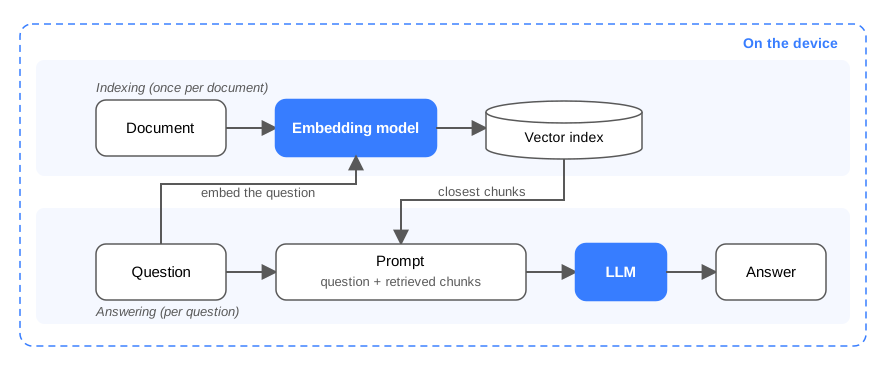
An on-device RAG pipeline: indexing and answering both happen inside the device, and nothing reaches a server.
How Do On-Device AI Agents Work?
Tool calling allows a local LLM to generate structured programmatic calls, such as function names with specific arguments, that the host app executes before returning the result to the model. This mechanism forms the backbone of on-device AI agents: routines where the model plans sequences of actions, checking system calendars, reading local files, or calling device APIs, to fulfill a user request.
Running agents locally lets them interact with personal user data while keeping that sensitive information bounded to the device. The Model Context Protocol (MCP) provides an open standard for exposing tools to local models. This local MCP voice assistant shows the full loop running on-device.
Agents also introduce a security risk that plain chat does not have: prompt injection. Retrieved documents or external data can contain hidden text structured like instructions, which the model might execute. Secure agent designs treat all retrieved text as untrusted data, enforce least-privilege boundaries around available tools, and require explicit user confirmation before destructive actions.
What Are the Use Cases of On-Device LLMs?
On-device LLMs are a strong fit wherever language processing involves private data, unreliable connectivity, or high interaction volume. Here are some examples across industries:
Automotive: In-cabin assistants answer driver queries, control vehicle settings, and process voice commands directly inside the vehicle, through tunnels, parking garages, and rural dead zones.
Consumer phone apps: Apps run real-time call screening and assistance directly on the phone. Call transcripts are processed on the hardware itself, which delivers low latency alongside an explicit privacy story.
Healthcare: Clinical environments combine strict privacy requirements, such as those imposed by HIPAA, with high documentation demands. Local models can summarize patient encounters and draft notes at the point of care while keeping processing closer to where sensitive data is generated.
Industrial and field operations: Maintenance, inspection, and safety logging often run where network connectivity is absent. On-device RAG over equipment manuals lets workers query procedures hands-free, and an on-device voice AI agent records observations and completes compliance reports in the field.
Regulated knowledge work: Legal, financial, and government teams routinely handle files that cannot be uploaded to external APIs. On-device RAG queries internal documents locally, and dictated notes and their summaries stay in local storage.
High-security environments: Industrial control networks, sensitive corporate R&D, and critical infrastructure prohibit external cloud connectivity by policy. In these environments, on-device deployment can make generative AI possible as it doesn't require sensitive systems to connect to external cloud services.
On-Device LLM vs Cloud LLM: Which Should You Choose?
Device-scale models trail frontier cloud models on open-ended reasoning and broad world knowledge, so the strongest products treat deployment as a per-workload choice, keeping fast local tasks on-device and routing heavy reasoning to a cloud model. Five factors help teams decide which workloads belong where: data sensitivity, connectivity, interaction latency, required model capability, and cost structure. A single product can land on both sides at once, running some features locally and sending others to a cloud model.
When On-Device LLMs Win
Sensitive data: Processing can happen where the data is generated or stored, reducing the number of external systems that need to handle sensitive health, financial, legal, or personal information.
Offline and connectivity-hostile environments: Vehicles, aircraft, field sites, and isolated networks keep full language capability, because inference runs on the hardware that is already there.
Interactive features: Typing assistance, live summarization, and voice interaction feel responsive because latency is set by the device, not the network.
High-volume features: Serving every request from rented cloud compute turns success into unbounded cost. Local inference runs on hardware already in users' hands, which is cost-effective at scale.
Model stability: The model only changes when the application ships a change, so certified workflows and long-lived products keep a stable, testable behavior surface.
When Cloud LLMs Win
Frontier capability: The largest cloud models hold reasoning depth and world knowledge that device-scale models trail, so workloads that need the strongest available model belong in the cloud.
Very long contexts: Cloud services run context windows into the hundreds of thousands of tokens, far past what device memory supports.
Newest models on day one: Cloud APIs surface new models the moment they release, with zero distribution work.
Weak hardware floors: A product whose install base includes old or low-memory devices may lack the headroom for a local model that meets its quality bar.
When a Hybrid LLM Architecture Works
Hybrid designs can route each request to the most appropriate tier based on factors such as capability, privacy requirements, latency, connectivity, and cost. Local-first routing answers common requests on-device and escalates hard ones to a cloud model. Sensitivity routing keeps private data local while generic queries travel. Offline fallback keeps a local model as the always-available floor beneath a cloud-preferred feature. Several shipped products already use a hybrid architecture. Apple, for example, pairs its on-device foundation model with its own cloud tier for requests the device cannot handle.
The three architectures compare as follows on those five factors:
On-device: Inference runs on hardware the user already owns, so the data never leaves the device, latency stays consistent regardless of network connectivity, and it stays cost-efficient at scale.
Cloud: Inference runs on provider servers, so data travels to third-party infrastructure and every request needs a connection. Latency includes a network round trip that varies with conditions, server compute is billed as usage grows, and capability reaches frontier models with very long contexts.
Hybrid: Each request goes to the tier that fits it, so sensitive data stays local while generic requests travel to the cloud. A local model remains the always-available floor, and cloud spend applies only where local capability ends.
How Does On-Device LLM Inference Work?
Understanding local model performance requires looking at how a large language model generates text. An LLM generates output one token at a time, where a token is a short sequence of text like a word fragment. The model predicts the next token from its previous context, appends the prediction, and loops until the output completes. During local execution, the inference engine runs this loop entirely in system memory, and performance behavior breaks down into two distinct runtime phases.
Prefill and Decode: The Two Phases of LLM Inference
Local inference performance depends on how efficiently the host processor handles two separate kinds of work:
Prefill (prompt processing): The engine processes the input prompt and builds the initial context needed for generation. This phase is typically compute-intensive, and its duration contributes to time-to-first-token (TTFT), the time between submitting a prompt and receiving the first generated token.
Decode (token generation): The engine generates tokens one at a time, and producing each token means running the entire model once. Every one of those runs reads the full model weights from memory, so decode is heavily memory-bandwidth-bound. Its throughput is measured in tokens per second, which sets how fast text streams across the screen. Applications stream each token to the interface as it is produced, so users start reading immediately and perceived latency tracks TTFT rather than full completion time.
Prefill stresses raw compute while decode stresses memory bus speed, so hardware acceleration for one phase can leave the other unchanged.
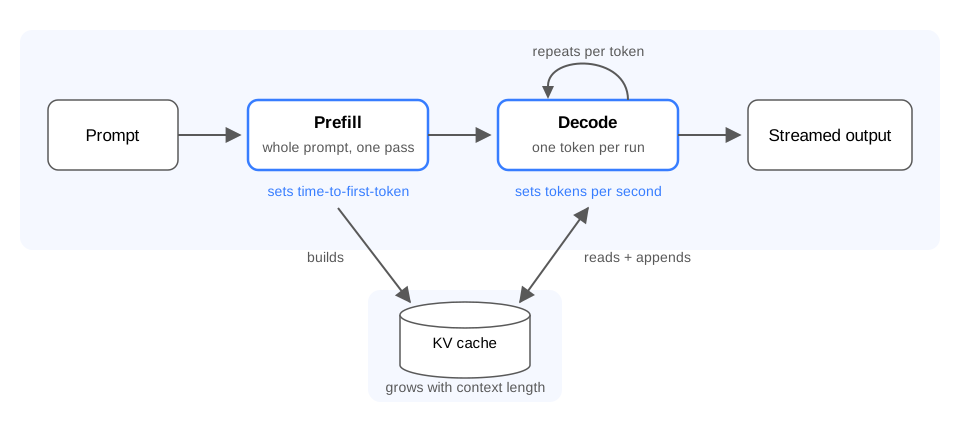
The two phases of on-device LLM inference: prefill builds the KV cache and sets time-to-first-token, and decode generates one token per run.
What Is the KV Cache in LLM Inference?
The Key-Value (KV) cache is the working memory an LLM keeps for the tokens it has already processed. Attention, the mechanism that lets the model weigh every earlier token when producing the next one, stores two summaries per token, a key and a value. Recomputing them for the whole context on every step would make generation unusably slow, so the engine keeps them in the KV cache and reuses them. Transformer-based LLMs, which include most models deployed today, depend on this cache to keep decode fast.
The cache creates a hardware trade-off:
Dynamic RAM growth: The cache grows with every additional token in the context window, on top of the memory the weights already claim. For a 7B-class model, a few thousand tokens of context can claim a gigabyte-scale slice of RAM, with the exact figure depending on the model's attention layout.
Context limits on device hardware: Edge devices share memory between the operating system, the application, and the inference engine, so local deployments typically enforce shorter context windows than cloud APIs.
What Hardware Do On-Device LLMs Need?
The main hardware requirements for on-device LLMs are (1) sufficient RAM to load the model and KV cache, (2) enough memory bandwidth to generate tokens efficiently, and (3) enough compute and thermal capacity to sustain inference. Depending on the model, any hardware can run an on-device LLM. For product teams, the practical question is the install base: the minimum hardware your users have, and how the feature feels there. Each of the three resources plays a distinct role:
Memory capacity (RAM): Determines whether a model can load into local memory alongside the operating system and host application.
Memory bandwidth: Determines how fast the model generates text.
Thermal and power budget: Determines how long a device can sustain local processing at full speed without throttling.
How Much RAM Does an LLM Need?
An LLM needs roughly 2 GB of RAM per billion parameters at full precision, and a quarter of that at 4-bit. The reason is simple arithmetic. A model is a collection of learned numeric values called parameters or weights, and each one is stored at a chosen precision. Memory for the weights equals the parameter count multiplied by the bytes per weight.
16-bit (FP16): The standard release format for open-weight models, meaning models whose trained weights are published for download. Each weight is stored as a 16-bit floating-point number (2 bytes), so the weights need roughly 2 GB of RAM per billion parameters.
8-bit (INT8): Each weight becomes an 8-bit integer (1 byte), cutting weight memory to roughly 1 GB of RAM per billion parameters.
4-bit: Each weight fits into half a byte, dropping weight memory to roughly 0.5 GB of RAM per billion parameters.
At 4-bit precision, a 1B model occupies roughly 0.5 GB of system RAM, a 3B model occupies 1.5 GB, and a 7B model requires 3.5 GB for the weights alone. The total application footprint runs higher, because the Key-Value (KV) cache grows with the target context length, while the host application and operating system claim their own share of available memory.
Sub-4-bit quantization pushes weight memory even lower, fitting a 7B model within 2 to 3 GB of RAM. Methods vary significantly in how effectively they preserve accuracy at these compression levels.
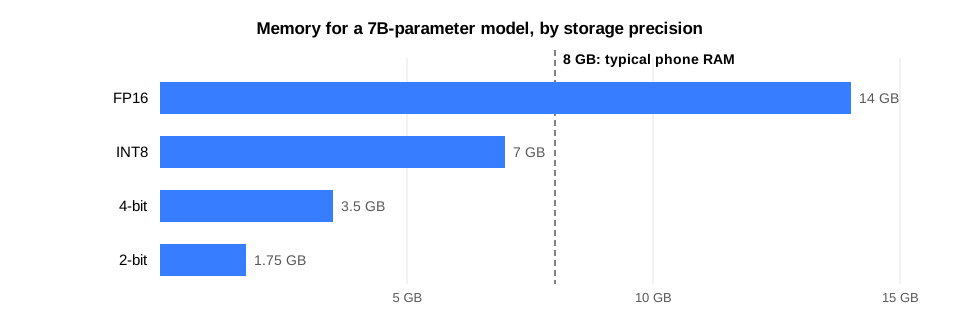
The same 7B model at four storage precisions.
Why Is Memory Bandwidth the LLM Inference Bottleneck?
Think of memory bandwidth as a physical conveyor belt: it limits how fast model weights can move from local RAM into the processor. During the decode phase, the inference engine streams the model's entire set of weights through the memory bus for every single generated token. This creates a hard theoretical ceiling on token generation speed:
Maximum Decoding Speed (Tokens/s) ≈System Memory Bandwidth (GB/s)Model Size (GB)
Running a 3.5 GB model behind a 60 GB/s mobile memory bus caps theoretical throughput at roughly 17 tokens per second, regardless of the raw compute the processor advertises. Compressing that same model to 2.5 GB via quantization reduces the volume of data moving across the bus for each token, lifting the theoretical ceiling past 20 tokens per second on the exact same hardware. Model compression therefore improves memory fit and generation speed together.
The width of this memory bus varies dramatically across hardware tiers:
Smartphones: Standard mobile processors move tens of gigabytes per second.
Laptops and desktops: Consumer chips move hundreds of gigabytes per second.
Datacenter accelerators: Dedicated enterprise GPUs move thousands of gigabytes per second across high-bandwidth memory (HBM).
This bandwidth gap explains why the exact same model feels vastly different across devices. Because average human reading speed is about 4-5 tokens per second, any local deployment that consistently clears this baseline feels responsive and fluid to the user.
See the same on-device LLM-powered voice assistant running on hardware from a Raspberry Pi to a single consumer GPU.
Do You Need an NPU to Run LLMs On-Device?
A Neural Processing Unit (NPU) is a hardware accelerator built specifically for tensor math at low power. Examples include Apple's Neural Engine, Qualcomm's Hexagon processor, and Google's Tensor chips.
For local LLM workloads, an NPU can accelerate compute-intensive operations and improve energy efficiency.
However, decode performance is often more constrained by memory bandwidth than by raw compute. As a result, NPU acceleration may have a smaller impact on sequential token generation than it does on compute-heavy parts of inference.
In practice, several factors determine whether an on-device LLM should run on an NPU, GPU or CPU. Performance depends not only on the hardware, but also on the efficiency of the inference runtime, the effectiveness of the quantization method, the rest of the system hardware, the operating system, and even the programming language and implementation used to build the application. When these components are well optimized, a model running on a CPU can outperform the same model running on an NPU. For products targeting a broad range of devices, performance should therefore be benchmarked across both CPU and NPU configurations rather than assuming that NPU acceleration will always deliver better results.
Can You Run an LLM on a Phone?
Yes. Small models run reliably on everyday smartphones, and the practical range grows with the device tier:
Mid-range and flagship phones: Models up to the 4B class fit comfortably in RAM at 4-bit precision.
High-end flagship phones: 7-8B-class models run on flagship phones under sub-4-bit compression, which shrinks their weights well below the 4-bit footprint.
Shipping an LLM inside a mobile app means working within two practical constraints:
App memory limits: iOS and Android cap how much RAM a single app may use, so the real memory budget sits below the spec-sheet RAM figure.
The install base's hardware mix: The RAM spread across the user base decides how large a model the product can ship without failing on older devices.
Teams commonly ship a lightweight default model for broad compatibility and enable a larger model on qualifying devices. Model files at these sizes rarely ship inside the app bundle itself. Apps typically download the model on first launch and store it locally.
How Do Battery and Thermal Limits Affect On-Device LLMs?
Generating text continuously keeps a device's memory system and processor busy, which creates heat. Fanless and battery-powered hardware, from phones and tablets to wearables and embedded boards, responds by slowing the chip down to cool off, a mechanism called thermal throttling. Long generations can start fast and gradually slow as the limits engage. Battery consumption also increases with sustained generation, so short interactions generally have a smaller impact than long-running inference.
On-device LLM features therefore work best when designed around brief interaction bursts:
Quick-burst features: Tasks like summarizing a note, drafting a reply, or extracting key information run for a few seconds. The device processes the request, cools back down, and preserves battery life.
Continuous tasks: Features that generate long passages over minutes deserve testing on target hardware under sustained load, measuring actual battery drain and thermal slowdown before launch.
How Do Large Language Models Fit on Small Devices?
Large language models fit on smaller devices primarily through quantization, pruning, and knowledge distillation, which reduce memory requirements while aiming to preserve the capabilities needed for the target application. Models are trained at datacenter scale and released as 16-bit weights, far beyond standard mobile and desktop budgets, and these three techniques close the gap:
Quantization: Shrinks the memory size of each individual weight.
Pruning: Removes unnecessary weights entirely.
Distillation: Transfers knowledge from a large "teacher" model into a smaller "student" model.
These techniques work together, and production workflows frequently stack them: a model might first be pruned and distilled to shrink its architecture, then quantized to minimize its final footprint for shipping. Throughout this process, developers run evaluations to verify that the compressed model keeps sufficient accuracy for production use.
Quantization: Fewer Bits per Weight
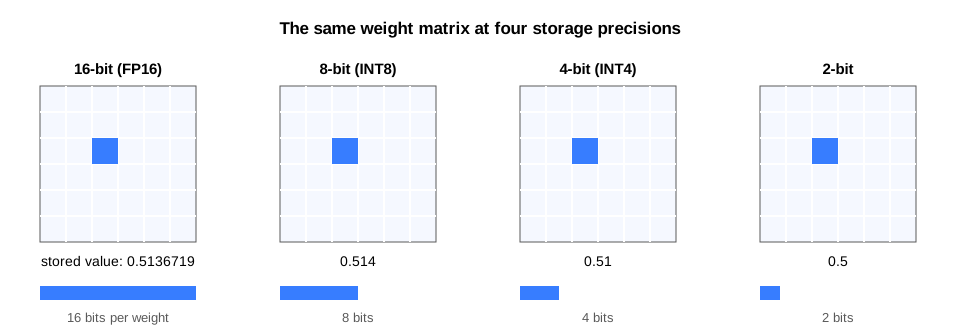
Quantization reduces the number of bits used to store each weight, down from the 16-bit floating-point (FP16) release format. The memory savings are roughly proportional to the reduction in bit depth, and smaller model weights can also increase the theoretical generation-speed ceiling when memory bandwidth is the limiting factor.
The core challenge is preserving model accuracy:
8-bit compression: Routinely safe with modern methods, holding accuracy near the full-precision original.
4-bit compression: The practical standard for mobile deployments, storing each weight as one of just 16 possible values. LLM quantization calibration methods like GPTQ and AWQ analyze sample data to protect critical weights and adjust surrounding values to limit accuracy loss.
The sub-4-bit frontier: Compression below 4 bits is where approaches diverge most sharply. Methods that assign one fixed bit depth to every weight lose accuracy quickly at these levels, and the strongest results come from spending the bit budget deliberately: more bits for the weights that matter most, fewer elsewhere.
Pruning: Removing Redundant Weights
Trained networks contain weights that contribute very little to their final output, and pruning identifies and removes them. Structured pruning cuts entire rows, attention heads, or network layers, so standard hardware runs the smaller architecture directly.
Meta used structured pruning on the Llama 3.1 8B network to build its compact Llama 3.2 1B and 3B models. In production pipelines, pruning acts as a stepping stone: it shrinks the base network first so that quantization can compress it further.
Knowledge Distillation: Small Models Learning from Large Ones
Knowledge distillation trains a compact "student" model to replicate the output behavior of a much larger "teacher" model. The process transfers capabilities and domain knowledge that the student would struggle to learn from raw training data alone.
Distillation is a primary reason today's small models punch above their weight. After pruning, Meta restored quality in its Llama 3.2 models by training them against the token predictions of its 8B and 70B teachers.
Perplexity and Benchmarks: Measuring Quality Loss
Model compression is only viable if capability survives the process, and engineering teams rely on standardized evaluation suites to quantify quality loss:
MMLU (Massive Multitask Language Understanding): A broad multiple-choice test of knowledge and problem solving across dozens of subjects.
ARC (AI2 Reasoning Challenge): A test of grade-school-level scientific reasoning and logic.
Perplexity: A measure of how well a model predicts reference text. Lower perplexity means the compressed model has kept more of its language ability.
Public benchmark scores narrow the field, and production teams should validate performance on their own product data. Two models with identical MMLU scores can perform differently on specialized domain tasks, so task-specific evaluation sets are the deciding test for deployment readiness.
picoLLM Compression, Picovoice's LLM quantization algorithm, scores 61.3 on MMLU with 2-bit Llama-3-8b, where fixed-bit methods like GPTQ collapse to 25.1, and the gap repeats across ARC and perplexity.
Open-source LLM Compression Benchmark MMLU Comparison
Which LLMs Can Run On-Device?
The deployable range is wide, and it maps to the task at hand. Matching the model tier to the job is the main selection decision:
Sub-1B models (task-specific): Models of a few hundred million parameters ship in a few hundred megabytes and run on nearly anything, including low-power embedded systems. Models at this scale handle focused jobs such as summarization, extraction, classification, and rewriting, the territory of Small Language Models, and a product that embeds a model for one job needs no broad world knowledge.
Up to 4B (compact general-purpose assistants): Models in this tier deliver broad assistant capability: instruction following, multi-turn dialogue, and open-domain answers. Llama 3.2's 1B and 3B releases target mobile hardware directly, as do Gemma's compact variants and Microsoft's Phi series. All three families ship in the picoLLM model catalog, already compressed for on-device use, so the same model file runs across mobile, web, and desktop.
7-8B (flagship and desktop class): These models deliver noticeably higher answer quality than the 4B tier on the same tasks. At 4-bit they strain phone memory, and sub-4-bit compression brings them into flagship reach. They run comfortably on laptops, desktops, and edge servers.
70B-class and beyond (workstation and server class): The largest open-weight models remain the territory of high-end workstations, local GPUs, and on-premises servers.
Below a few billion parameters, architecture, training data, and optimization can matter as much as parameter count, allowing newer small models to outperform older, larger models on specific tasks. Parameter count alone is a poor selection criterion. Availability is rarely the constraint: the picoLLM model catalog ships many of these open-weight families, from Gemma and Phi to Llama 3.2 and Mixtral, pre-compressed at multiple bit depths for on-device deployment.
Base Models vs Instruction-Tuned Variants
Most open-weight families ship in two variants, and the choice decides how the model behaves in your product:
Base models: The raw pretrained network, trained on next-token prediction. Base models are good at completion-style generation and act as the starting point for custom fine-tuning.
Instruction-tuned variants (
-instructor-it): Further trained to follow directions, answer questions, and hold a dialogue. Assistants, question answering, and RAG call for the instruction-tuned variant.
Can You Fine-Tune an On-Device LLM?
Yes, although the fine-tuning itself happens before deployment rather than on the device. Fine-tuning adapts a base or instruction-tuned model to a specialized domain, tone, or task.
There are two ways to do it. Full fine-tuning retrains every weight in the model, which requires GPU infrastructure and produces a separate model file for each variant. Low-Rank Adaptation (LoRA) trains small add-on matrices while the original weights stay frozen, at a fraction of the compute and memory. For on-device products, LoRA is the practical route. Developers can train specialized adapters offline and package them with the application, and a single application can carry several lightweight adapters, one for code generation, another for tone, a third for structured extraction, and switch between them at runtime without reloading the base weights.
A fine-tuned model still has to be compressed and evaluated like any other before it ships.
How Should You Ship an On-Device LLM?
How an on-device LLM is packaged determines who controls the model, which devices are covered, and who carries the operational work.
Built-In OS Models: Apple Foundation Models and Gemini Nano
Apple's Foundation Models framework gives Swift code access to the roughly 3B-parameter model behind Apple Intelligence, with no download, API key, or per-request cost, and as of June 2026 it also accepts third-party models through a public protocol. The catch is the hardware floor, which starts at the iPhone 15 Pro and M-series Macs and iPads. On Android, Gemini Nano plays the same role through the AICore system service and its ML Kit APIs, and it is likewise limited to a flagship-gated set of devices.
The built-in route removes model distribution and update work, but it also hands the OS vendor the decisions about which model runs, what it can do, and which devices qualify. A product that fits inside those decisions can ship quickly this way. A product that needs a specific model, consistent behavior across OS versions, or coverage beyond the newest devices needs one of the other routes.
Open-Source LLM Runtimes: llama.cpp, ExecuTorch, and MLC
The open-source route bundles a runtime and a model of your choosing into the application. llama.cpp is a C/C++ engine with a large open-model ecosystem, used mainly for CPU inference. ExecuTorch is PyTorch's on-device runtime, built to carry exported models across mobile and embedded backends. MLC compiles models for many targets, including GPU-accelerated execution in browsers.
The route trades full control for full responsibility: any model on any device, with your team owning per-platform integration, quantization choices, model updates, and support. Running llama.cpp, or a wrapper around it like Ollama, in production is its own engineering discipline, and enterprise teams should scope it before committing.
Commercial On-Device LLM SDKs
The commercial route pairs vendor-compressed models with supported, cross-platform SDKs under a license. This route exists to take over the work the open-source route leaves to your team: a team gets pre-optimized model files, one integration surface across mobile, web, embedded, and desktop, and a vendor accountable for correctness and support. For example, picoLLM works this way, running the same compressed model files through SDKs that share one API design across mobile, web, embedded, desktop, and server. The route fits products that need better compression than community tools provide, support for more platforms than a single runtime covers, or a vendor standing behind the stack. The cost is a commercial dependency, so the same lifecycle questions apply to the vendor as to any critical supplier.
The three routes answer the same five questions differently: who chooses the model, which devices are covered, how much integration the team builds, who owns updates and support, and what the cost structure looks like.
Built-in OS LLM: The OS vendor decides the model and what it can do, coverage stops at the newest devices, integration is one native API, the OS handles updates, and use is free.
Open-source LLM runtime: Any open-weight model runs on any device you integrate, but integration is built per platform, your team owns quantization, updates, and support, and the cost is ongoing engineering time.
Commercial on-device LLM SDK: The vendor's pre-compressed catalog runs across every SDK-supported platform through one API design, the vendor carries compression, updates, and support, and the cost is a commercial agreement instead of an in-house engineering effort.
Running LLMs in the Browser
Running an LLM in the browser keeps inference local while removing the install step entirely, since the user only opens a URL. The same two routes exist on the web, built-in or bundled, through web-native APIs:
Built-in OS model, web edition: Chrome's Prompt API exposes Gemini Nano directly to web pages. The browser downloads the model once and shares it across origins, so web apps gain local AI capability with no model file for the site to ship.
Bundled model, web edition: For custom models, WebGPU provides low-level GPU acceleration for in-browser engines like WebLLM. WebAssembly with SIMD, the CPU's parallel math instructions, runs inference on every browser, including Safari and Firefox where WebGPU support lags.
For product teams, the web route transforms distribution. A user opens a URL, the model loads into local cache, and prompt processing stays inside the browser tab. The initial download rides the user's connection before the first interaction, so model size discipline matters double here.
How to Add an On-Device LLM to Your Application
This walkthrough shows the commercial route in practice, using the picoLLM Inference Engine with its Python SDK. picoLLM runs compressed open-weight models fully on-device across Linux, macOS, Windows, and Raspberry Pi.
Step 1: Pick the On-Device LLM Engine and Model
Sign up for Picovoice Console, copy the AccessKey from the home page, and download a model file (.pllm) from the picoLLM page. The catalog spans open-weight families from Gemma and Phi to Llama 3.2 and Mixtral, at multiple compression levels. For an assistant-style application, pick the instruction-tuned variant of your chosen model.
Step 2: Install the On-Device LLM SDK
Install the picollm Python package:
Step 3: Load the Model and Generate Text
Create the engine with the AccessKey and model path, then generate a completion:
Call pllm.interrupt() to cancel a generation in progress, and release resources with pllm.release() when the engine is no longer needed.
Step 4: Stream Tokens in Real Time
Pass a stream_callback to receive completion text piece by piece as the model generates it. Streaming is the pattern behind fluid LLM interfaces:
For multi-turn conversations, pllm.get_dialog() returns a dialog object that manages the chat template of the loaded instruction-tuned model. The picoLLM Python quick start covers the full flow, and the SDKs for Android, iOS, Web, Node.js, C, and .NET follow the same structure.
On-Device LLM Best Practices
Start with the smallest model that meets your quality requirements: Larger models generally require more memory, increase latency, and consume more power. An oversized model taxes every interaction for extra headroom your feature may never need.
Evaluate on target hardware: Workstations have bandwidth and thermal budgets that mid-range smartphones lack. Desktop benchmarks predict very little about mobile performance.
Budget memory for weights and cache together: At production context lengths, the Key-Value (KV) cache can equal or exceed the size of a small model's weights. Size the total memory footprint around the full pipeline.
Stream tokens to the UI: Perceived speed tracks time-to-first-token when output streams continuously. Streaming makes the exact same model feel significantly faster.
Test sustained generation under thermal load: Hardware throttling kicks in minutes into heavy execution. A feature validated on brief bursts can degrade during longer sessions.
Re-validate compressed models on product data: General benchmarks narrow the field, but real inputs decide quality. A quantized model that holds its MMLU score can still drift on domain-specific tasks.
Plan distribution and fleet updates early: Model files are large assets with their own release cadences, and updating weights across a user fleet takes dedicated over-the-air delivery engineering.
Review open-weight licenses with legal: Terms vary significantly across model families, from permissive Apache 2.0 releases to Meta's acceptable-use terms. Legal review is cheap compared to re-platforming after launch.
Document the privacy story for compliance: Processing data locally is a checkable architectural fact. Documenting local data boundaries gives compliance and legal teams the proof they need.
picoLLM addresses several of these practices out of the box: the model catalog spans sizes and bit depths so teams can start small and scale up, published benchmarks compare accuracy against GPTQ at 2, 3, and 4 bits, and token streaming is built into every SDK.
Developer Resources
Platform-Specific Tutorials
Pick the target platform and start building:
- How to Run LLMs Locally with Python
- How to Run a Local LLM on Android
- How to Run a Local LLM on iOS
- How to Run a Local LLM on Windows
- How to Run an LLM Locally on Mac
- How to Run a Local LLM using Node.js
- Run Local LLM Inference in C
- Local LLM Inference in .NET
- Local LLM on Raspberry Pi
Cookbook Recipes
- LLM Voice AI Agent and Assistant
- On-Device RAG: Voice Document QA
- On-Device Voice Memo Assistant
- AI Call Assist
Additional Resources
- Power of LLM Quantization
- Sub-4-Bit LLM Quantization
- llama.cpp vs Ollama for Enterprises
- Evaluating Large Language Models
- Top Free and Open-Source Large Language Models
- Open-Source LLM Compression Benchmark
Conclusion
Shipping an on-device LLM comes down to three decisions:
Decide where inference runs. Running inference on-device gives products privacy, offline resilience, predictable latency, and cost efficiency at scale. The workloads that genuinely need frontier-scale reasoning can still route to a cloud model.
Match the model to the task. The smallest model that meets the required quality bar is often the best choice for constrained hardware, while the compression method and inference stack determine how efficiently that model fits within the available memory, latency, and power budget.
Choose the shipping route. Built-in OS models are the fastest start, and the OS vendor decides the model, the devices, and the capabilities. Open-source runtimes give full control, and the team carries integration, updates, and support. Commercial SDKs keep the model choice and the platform coverage while a vendor carries that operational work.
Measure before committing. Compression methods differ most where memory budgets are tightest, and picoLLM holds near-FP16 accuracy at 3-bit and keeps 61.3 MMLU on 2-bit Llama-3-8b, where fixed-depth methods collapse. To start building, get an AccessKey from Picovoice Console and follow the quick start for your platform. Teams with additional platform or deployment requirements can contact Picovoice.
Frequently Asked Questions
To run an on-device LLM, you need enough RAM for the compressed model, with extra room for conversation history (the KV cache). At standard 4-bit precision, models up to the 4B class need about 1 to 2.5 GB of RAM, the practical range for mobile apps. Larger 7B models need about 3.5 GB, and sub-4-bit picoLLM model files shrink them further, which brings them within reach of high-end flagships and laptops.
Yes. An on-device LLM can run without an internet connection when the model and inference engine are available locally. picoLLM supports fully offline data processing, while an AccessKey is used to manage account usage.
Prompts, documents, and generated text are processed on the hardware where they originate, and no third-party service receives them. This architectural property simplifies GDPR and HIPAA compliance work, because the sensitive data flow that would need auditing is absent by design.
For focused tasks such as summarization, extraction, dialogue, and document QA, well-chosen small models perform at production quality. Frontier cloud models keep an advantage on open-ended reasoning and broad world knowledge. The compression and inference stack decides how much capability fits a device budget, and picoLLM holds 61.3 MMLU on 2-bit Llama-3-8b where GPTQ drops to 25.1.
Generation speed is bounded by memory bandwidth divided by model size, so a compact model on a modern phone produces tokens faster than people read, and the same model on a desktop GPU runs several times faster. Reading speed is 4-5 tokens per second, which practical deployments clear with headroom, and smaller compressed models generate faster on the same hardware.
Cross-platform SDKs run the same compressed model file through the same API structure on each platform, so the integration work carries across mobile, web, and desktop. The picoLLM quick starts show the identical flow in Python, Android, iOS, Web, Node.js, C, and .NET.


